Getting Started with Cars
Sign up for a Duffel account (it takes about 1 minute!)
On the navigation header, click on "More", then navigate to "Developers"
Create a test access token from the "Access tokens" page in your Dashboard
curl in your terminal, script the flow using your preferred programming language, or use the API via an HTTP client like Postman.1. Search for available rates
The location and date/time you wish to pick your car up. The location is a latitude and longitude with a radius.
The location and date/time you wish to drop your car off. If you are picking up and dropping off at the same location, you can provide the same location again.
Some information about the main driver of the car - namely their age on the date of pickup and country of residence. The driver information can affect the pricing and availability of rates which are returned (for example, some suppliers do not allow drivers under a certain age, and some will add a young driver surcharge), so these are required.
JavaScript
duffel.cars.search({pickup_date: "2026-09-05",pickup_time: "16:00",dropoff_date: "2026-09-13",dropoff_time: "10:00",pickup_location: {radius: 1,geographic_coordinates: {latitude: 51.470020,longitude: -0.454295}},dropoff_location: {radius: 1,geographic_coordinates: {latitude: 51.470020,longitude: -0.454295}},driver: {age: 30,residence_country_code: "GB"}})
prepaid- These rates are paid for in full when creating a booking. These rates often come at a discount compared to postpaid or guarantee rates, but are commonly non-refundable, or only cancellable for a penalty.guarantee- These rates are paid entirely at the counter, but payment card details are required to reserve the car. No charge is made during the booking flow, but a penalty may be due in the case of a late cancellation or no-show.postpaid- These rates are paid entirely at the counter. No card details are required to book these rates. This is the most common scenario when booking a rental car.
2. Create a quote for your selected rate
JavaScript
duffel.cars.quotes.create({rate_id: "rae_0000B49nObUBsHAG0v8vJy"})
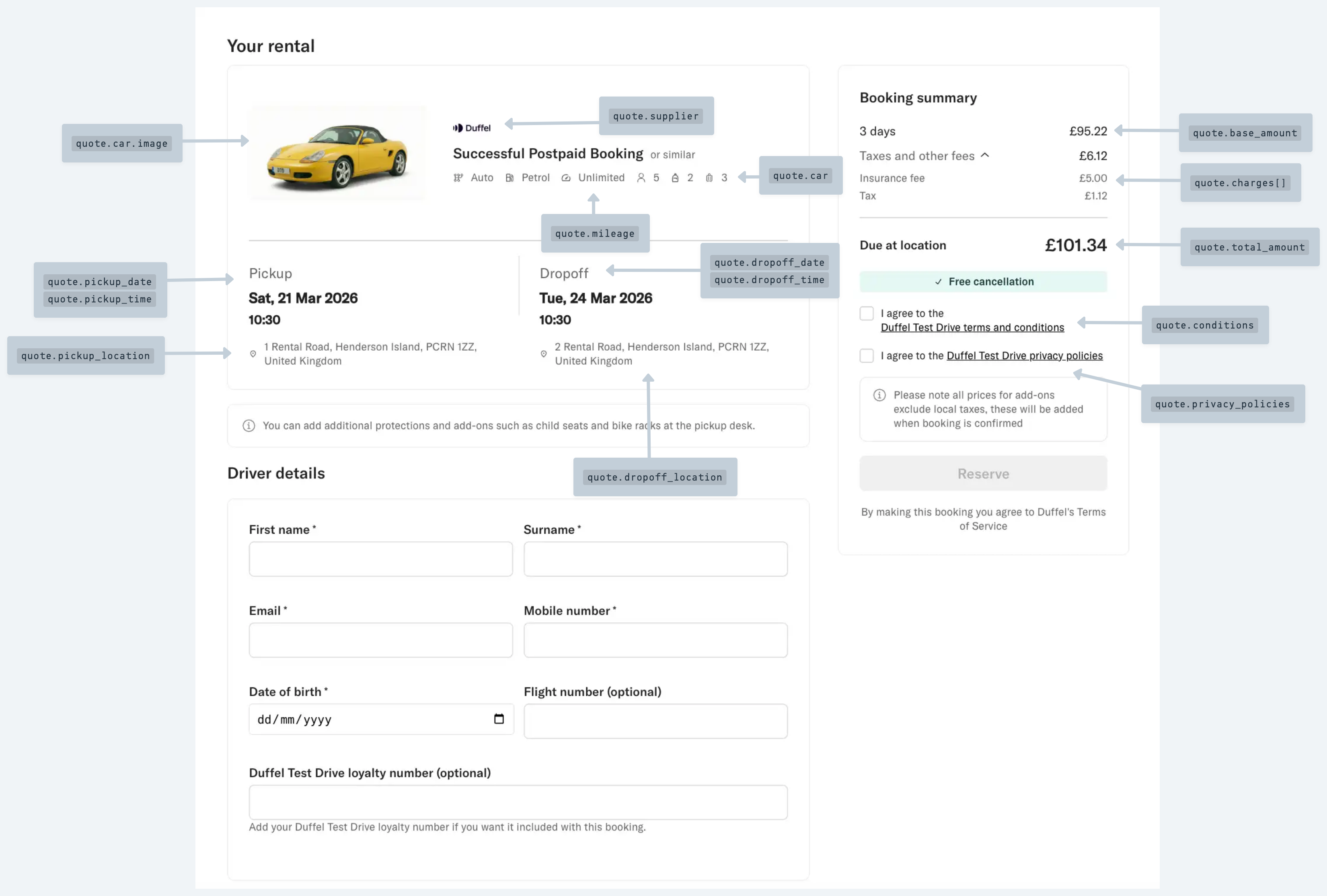
Required Checkout fields
2. Create a booking
JavaScript
duffel.cars.bookings.create({quote_id: "qut_0000B49nObUBsHAG0v8vJy",driver: [{given_name: "Amelia",family_name: "Earhart",date_of_birth: "1987-07-24",phone_number: "+44777123123"}]})
The booking reference -
booking.referenceThe booking driver’s name -
booking.driver.given_name+booking.driver.family_nameThe date the booking was confirmed -
booking.confirmed_atThe phone number of the pickup and drop off locations, if present -
booking.pickup_location.phone_number
id using the get booking endpoint.